Western and Gel Background
Background Group
The resources below explain background subtraction in Image Studio Software for gels and blots.
Lane Background Method
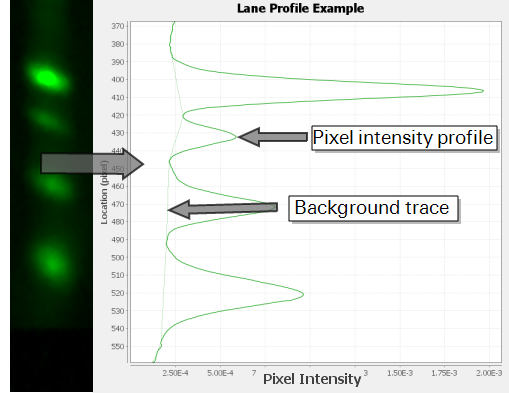
The Image Studio Lane background method works by drawing a linear connection between areas of minimum brightness between shapes in a lane and subtracting the background noise that falls beneath the lines.
The Lane background procedure outlined below requires more extensive explanation than the other background methods.
Lane Center Found for Analysis
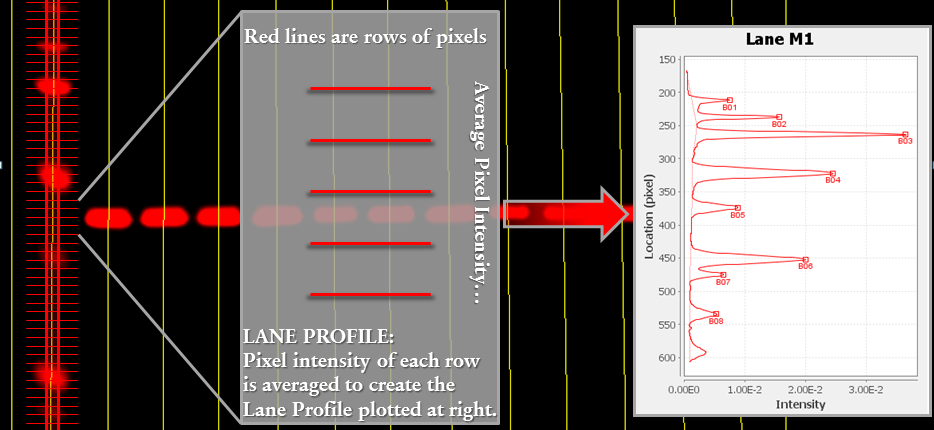
The Image Studio Lane background subtraction procedure analyzes the middle 75% of a lane to compensate for variable shape width throughout the lane. The program uses the center lane line to establish the correct area to include in analysis. The lane line is first centered approximately by the user and then optimally positioned by the software during band-finding (the software will find the exact middle of the lane, do not worry about getting the line exactly positioned).
Average Pixel Intensity Computed
Next, a lane profile is created
A Background Curve Is Calculated
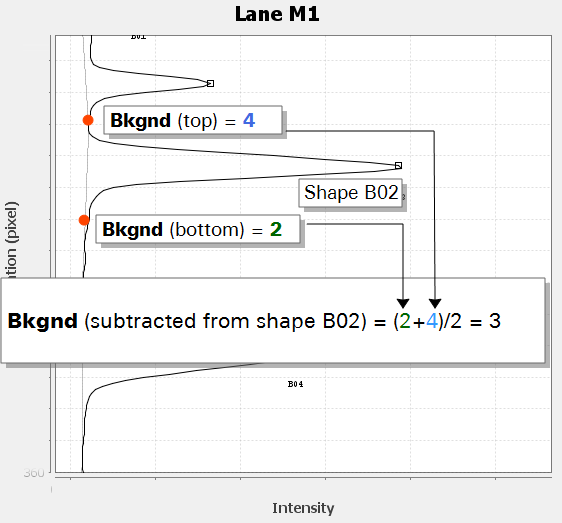
Background is then established by drawing a linear connection between local minima in the Intensity vs. Location graph, as long as the slope of the line is below a threshold value. Limiting the slope prevents the possibility of drawing lines through a significant portion of a signal peak. Minima that would create a slope that is too steep are skipped, and the next point that would create a line with a slope below the threshold value is used.
Image Studio Software will not seek local minima in shapes that have been added manually. Manually added shapes are skipped, because they have been designated as important by the user.
Background Subtracted
The background curve value at the top and bottom of a shape are averaged to find the background value. The background value is subtracted from the Total of the shape to find the Signal for the shape.
Average and Median Background Methods
The Average and Median background methods will be discussed together, because they are the same except for using an average versus median.
How the Average and Median Methods Calculate Bkgnd and Signal
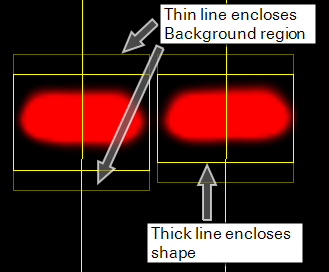
Bkgnd: The Average or Median background method computes the average or median intensity of pixels in a border around a shape and subtracts that background from the shape.
Signal: The signal for each shape is calculated by finding the Total for a shape and subtracting the product of the Bkgnd and the Area.
Using Average and Median Background Methods
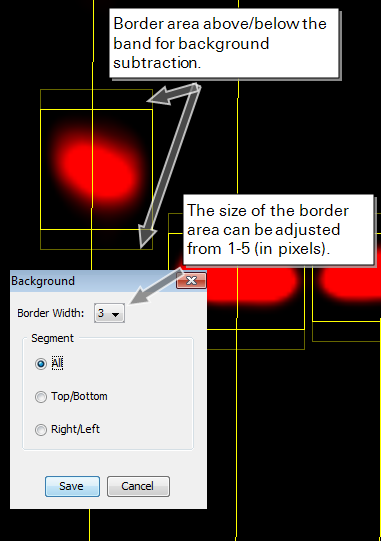
The area used to compute background is taken from a three pixel border around all sides of the shape by default. However, the border can be changed to the left and right or above and below the shape and the width can be adjusted from 1 - 5 pixels
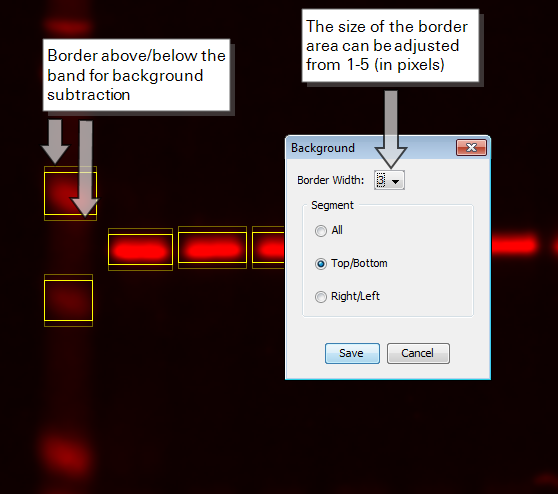
To change the border width and location:
- Ensure the Analysis tab is visible.
In the Background group, click the Set Background Type list
 and select Average or Median.
The Background dialog will open.
- Change the desired settings.
- Click OK.
User-Defined Background Method
The User-Defined background method finds the average pixel intensity within a shape or shapes placed by the user to calculate background. More information is provided below.
How the User-Defined Method Calculates Bkgnd and Signal
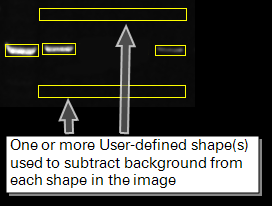
Bkgnd: The User-Defined background method finds the average pixel intensity within a shape placed by the user to calculate background.
Signal: The signal is calculated by finding the Total for the shape and subtracting the product of the average intensity of the pixels in the user-defined background and the Area.
Using the User-Defined Background Method
Multiple shapes can be designated as background by holding down the CTRL key and clicking each shape individually or clicking and dragging a rectangle around the shapes. If multiple shapes are selected, they will be averaged together to find the background.
Selected shapes should be designated as background by clicking Assign in the Background group of the Analysis tab. The Assign button for add-on applications may also be located in that application's Analysis tab (e.g. the Small Animal Image Analysis tab).
When to Use None
Unless data are going to be exported for analysis using a third-party software, do not choose None.
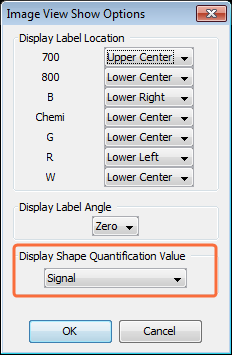
Signal will not be calculated if None is chosen, so the Total for each shape must be used in outside calculations.
To change the quantification value that appears above each shape from Signal to Total:
Click the small arrow at the bottom right of the Show group in the Analysis tab.
The Image View Show Options dialog will open
- In the Image View Show Options dialog, change the Display Shape Quantification Value to Total.
Click OK.
The displayed quantification value will be changed to None in all images.
Background Subtraction for Blots and Gels
This page provides a quick look at background subtraction options for blot and gel analyses. You can refer to the background subtraction guide for complete information.
|
Background Options for Analyzing Blots and Gels (available without additional keys) | |||
Method | Best Use Cases | Method Comparison | Background Calculation |
| Average or Median (Local Methods) |
|
|
|
| User-Defined |
|
|
|
| Background Options for Analyzing Blots and Gels (requires Western Analysis Key) | |||
Method | Best Use Cases | Method Comparison | Calculation |
| Lane |
|
|
|
Example | Recommended Method(s) | Other Method(s) |
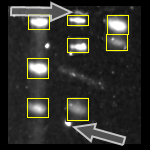 |
Local background methods are appropriate, since only a few, widely spaced shapes need to be quantified. Use Median to reduce the impact of spurious bright pixels around the shapes (see arrows).
The Image Studio Lane method will work, if available. |
Average may be skewed by outlier bright pixels surrounding the shapes.
The highly variable background means User-Defined is not the best choice. |
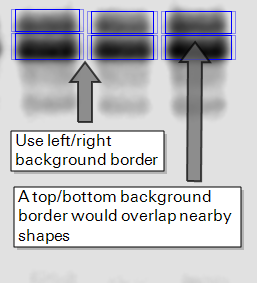 |
The background does not contain spurious bright pixels, so Average or Median may be used. Be careful that the background border does not overlap a nearby shape.
The Image Studio Lane method will work, if available. |
The uniform background means User-Defined may be employed. However, local methods are preferable, because they sample background directly surrounding shapes. |
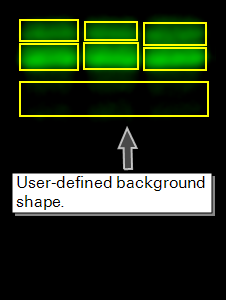 |
Closely-spaced shapes might make it difficult to keep the background border from local background methods from overlapping an adjacent shape. The uniform background means the User-Defined method can be a solution.
The Image Studio Lane method will work, if available. |
The background border from local methods could overlap another shape. |
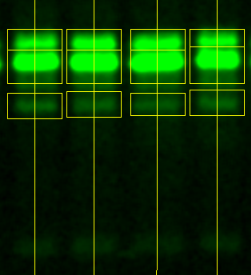 |
The Image Studio Lane method is ideal for subtracting background from many close together shapes in a lane. |
The background border from local methods could overlap another shape.
User-Defined might not accurately represent background caused by smearing in the lane. |